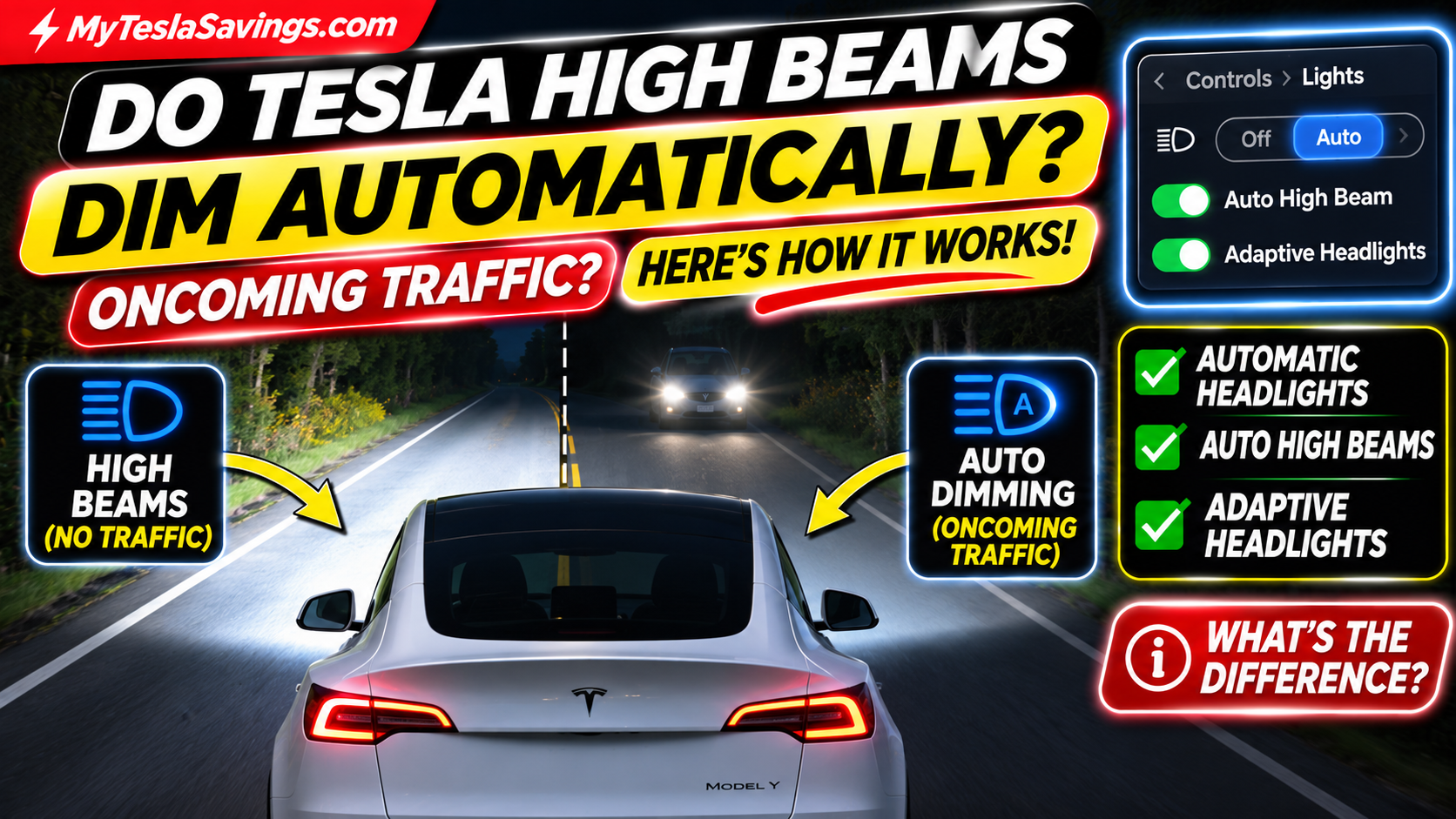
Have you ever been driving your Tesla down a dark country road and wondered whether your high beams will automatically dim when another car approaches?
It’s a question worth asking, especially if you’re new to Tesla ownership.
You turn on your headlights, the road ahead lights up, and suddenly you see another vehicle approaching.
Do you need to manually switch to low beams?
Or will your Tesla handle it automatically?
The answer is yes — your Tesla can automatically reduce high-beam lighting for oncoming traffic, provided the appropriate feature is enabled and operating correctly.
However, there’s something many owners don’t realize:
Automatic Headlights, Automatic High Beams, and Adaptive Headlights are not necessarily the same thing.
Depending on your Tesla’s model year, hardware, software, and region, your car may use different technology to control nighttime lighting.
Some Teslas switch between high and low beams.
Others have adaptive headlights capable of selectively dimming portions of the high-beam pattern.
In this guide, we’ll explain how Tesla’s automatic lighting works, how to turn it on, what the dashboard symbols mean, and what to do if your high beams aren’t dimming when another vehicle approaches.
We’ll also cover the refreshed Tesla Model Y Juniper, Model 3, and common nighttime driving questions.
Quick Answer: Do Tesla High Beams Automatically Dim for Oncoming Cars?
Yes, if your Tesla has Auto High Beam or Adaptive Headlights enabled and the system detects conditions that require reducing high-beam illumination.
Here’s how the features differ:
| Tesla lighting feature | What it does |
|---|---|
| Automatic Headlights | Turns headlights on or off based on ambient lighting |
| Auto High Beam | Automatically switches between high and low beams when conditions warrant |
| Adaptive Headlights | Adjusts the headlight beam pattern and, on supported systems, selectively dims high-beam segments |
| Manual High Beams | Lets the driver directly control high-beam operation |
| Headlights After Exit | Keeps exterior lights on briefly after parking in low-light conditions |
Important: Automatic high-beam control is a driver-assistance feature, not a guarantee that other drivers will never experience glare.
You are still responsible for making sure your headlights are appropriate for traffic and road conditions.
1. How Do Tesla Automatic Headlights Work?
Tesla vehicles offer automatic headlight operation.
When the headlights are set to Auto, the vehicle can turn them on or off according to detected lighting conditions.
For example, the headlights may activate when:
- Driving after sunset.
- Entering a dark parking garage.
- Traveling through a tunnel.
- Driving in sufficiently low ambient light.
They may turn off when lighting conditions improve.
How to Turn On Automatic Headlights
- Open Controls on your Tesla touchscreen.
- Select Lights.
- Locate the headlight controls.
- Select Auto.
On many Teslas, Auto is the default headlight setting.
However, setting your headlights to Auto does not by itself mean your high beams will automatically dim.
That behavior depends on the Auto High Beam or Adaptive Headlights feature.
2. What Is Tesla Auto High Beam?
Auto High Beam is designed to make nighttime driving more convenient.
When enabled, your Tesla can automatically switch between high and low beams based on detected lighting conditions.
Example: Driving on a Dark Road
Imagine driving your Tesla Model 3 on a dark two-lane road.
There are no streetlights, and no other vehicles are visible.
Your Tesla may activate the high beams to illuminate more of the road ahead.
A few moments later, another vehicle approaches from the opposite direction.
The system detects the approaching headlights.
Your Tesla can automatically switch to low beams to reduce glare.
After the other vehicle passes and conditions permit, the high beams may turn on again.
Does This Work for Cars Traveling in Front of You?
Auto High Beam is intended to respond to relevant lighting ahead, which can include other vehicles.
However, detection is not perfect.
You should manually select low beams whenever necessary to avoid dazzling other road users.
3. How to Turn On Tesla Automatic High Beams
The exact controls depend on your Tesla’s model year and software version.
Step 1: Open the Lights Menu
On the touchscreen, select:
Controls → Lights
Step 2: Find Your Automatic High-Beam Feature
Look for one of these settings:
- Auto High Beam
- Adaptive Headlights
The available option depends on your vehicle.
Step 3: Enable the Feature
Turn on the relevant setting.
Step 4: Check the Headlight Indicator
When the feature is active, the touchscreen can display a headlight symbol containing the letter A.
The indicator changes depending on whether high beams are currently operating.
Step 5: Drive Normally and Monitor the System
The vehicle can manage high-beam lighting when appropriate.
However, always watch for oncoming traffic and manually dim the headlights if necessary.
Tip: Don’t try to test the system by intentionally shining high beams at another driver. Observe its behavior during ordinary nighttime driving.
4. Tesla Model Y Juniper: Do the New Headlights Automatically Dim?
The refreshed Model Y Juniper introduces a particularly interesting aspect of Tesla lighting technology.
On appropriately equipped vehicles, Adaptive Headlights can adjust the beam pattern instead of simply switching the entire high-beam system off.
How Adaptive Headlights Work
Traditional automatic high beams typically operate in two states:
- High beams on.
- High beams off.
Adaptive headlights can offer more sophisticated control.
When the system detects an approaching vehicle, supported headlights can selectively dim portions of the beam pattern to reduce glare.
That means other portions of the road may remain illuminated.
Example
Imagine you’re driving down a dark highway in your Model Y Juniper.
Your high beams are illuminating the road ahead.
An oncoming vehicle appears.
Instead of necessarily switching off all high-beam illumination, an adaptive system may dim the sections directed toward the approaching car.
This can help preserve visibility in other areas.
Does Every Juniper Have This Feature?
Do not assume every Model Y Juniper has identical headlight capabilities.
Availability and behavior depend on market region, vehicle configuration, software, and installed hardware.
To check your vehicle, open:
Controls → Lights
If you see Adaptive Headlights, your vehicle has that feature available in its current configuration.
If you see Auto High Beam, your vehicle uses the automatic high-beam controls described for that system.
5. Tesla Auto High Beam vs. Adaptive Headlights: What’s the Difference?
This is one of the most important distinctions in the article.
| Feature | Auto High Beam | Adaptive Headlights |
|---|---|---|
| Responds to detected traffic | Yes | Yes |
| Automatically reduces high-beam lighting | Yes | Yes |
| Typical operation | Switches high and low beams | Adjusts beam pattern |
| Can selectively dim individual beam segments | Not the basic function | On supported systems |
| Helps improve nighttime visibility | Yes | Yes |
| Requires driver supervision | Yes | Yes |
Adaptive Headlights may also adjust illumination for curves and other road conditions on supported vehicles.
Bottom line: Both features can help manage nighttime lighting, but adaptive systems offer additional control where available.
6. What Do the Tesla Headlight Symbols Mean?
Your Tesla touchscreen uses headlight indicators to show which lighting mode is active.
Understanding these icons can help you determine whether automatic high beams are operating.
| Dashboard indicator | Meaning |
|---|---|
| Green low-beam symbol | Low beams are on |
| Blue high-beam symbol | High beams are on, but automatic control is disabled or unavailable |
| Blue high-beam symbol with A | High beams are active and automatic adjustment is ready |
| Gray high-beam symbol with A | Automatic control is enabled, but high beams are not currently on |
For example, you may see the gray A indicator when driving through a well-lit parking lot.
That’s because the system may determine that high beams are unnecessary.
On a dark road, the blue A indicator may appear when automatic high-beam operation becomes active.
Important: Indicator appearance and behavior can vary by vehicle and software version.
Keep Your Tesla Windshield Crystal Clear
Your Tesla's automatic high beams and camera-based driving features depend on clear visibility. Dirt, streaks, and smudges can make nighttime driving harder. A quality windshield cleaning kit helps keep your glass clean and improves visibility during nighttime driving.
As an Amazon Associate, MyTeslaSavings.com earns from qualifying purchases.
7. Why Aren’t My Tesla High Beams Turning On Automatically?
If your high beams don’t activate on a dark road, it doesn’t necessarily mean something is broken.
Several factors can affect automatic high-beam operation.
Reason #1: The Feature Isn’t Enabled
Check Controls → Lights and verify the appropriate setting.
Reason #2: There’s Too Much Ambient Light
Streetlights, illuminated parking lots, and other lighting may prevent high beams from activating.
Reason #3: Another Vehicle Is Detected
Your Tesla may keep its high beams off when it detects relevant lighting from traffic ahead.
Reason #4: You’re Driving at Low Speed
Some Tesla configurations restrict automatic high-beam operation at lower speeds.
Reason #5: Heavy Traffic
Automatic high beams may remain off in heavy traffic.
Reason #6: Camera Visibility Is Reduced
Rain, fog, snow, dirt, or other obstructions can affect how well the system detects road conditions.
Reason #7: Software or Vehicle Configuration
Feature availability and operation can change depending on the vehicle and installed software.
If the feature remains unavailable under appropriate conditions, consult your Owner’s Manual or contact Tesla Service.
8. Why Aren’t My Tesla High Beams Dimming for Oncoming Traffic?
This is the problem owners should pay particular attention to.
If your high beams remain bright when another vehicle approaches, do not assume the automatic system will eventually respond.
Manually reduce high-beam lighting whenever necessary.
Possible explanations include:
- Auto High Beam or Adaptive Headlights is disabled.
- The system hasn’t detected the approaching vehicle.
- Road curves or hills are affecting visibility.
- The forward-facing camera’s view is obstructed.
- Weather conditions are interfering with detection.
- The vehicle is using a different lighting mode than expected.
What Should You Do?
First, manually select low beams to avoid glare.
Then, when safely parked, check the lighting settings and look for warnings.
If automatic operation repeatedly fails under normal conditions, request Tesla Service.
9. How to Manually Turn Tesla High Beams On and Off
Tesla has used different headlight controls across model years.
Older Tesla Model 3 and Model Y Vehicles
On vehicles equipped with a turn-signal stalk, high-beam operation is controlled through the stalk.
The exact push or pull action depends on the vehicle configuration.
Refer to the Owner’s Manual for your specific model.
Newer Tesla Model 3 and Model Y Vehicles
Some newer configurations use a high-beam button on the left side of the steering wheel.
On supported vehicles:
- A quick press flashes the high beams.
- Pressing and holding can latch the high beams on.
- Pressing again can turn them off.
The touchscreen may display additional lighting controls when the button is used.
Why This Matters
If automatic high beams fail to dim appropriately, you must know how to manually control your headlights.
Familiarize yourself with the controls while parked, before driving at night.
10. Do Tesla Automatic High Beams Work in Rain, Snow, or Fog?
Automatic high-beam systems have limitations in poor weather.
Heavy rain, snow, fog, and dirty cameras can reduce detection reliability.
High beams can also reflect off fog, snow, or heavy precipitation and make visibility worse.
Best Practice
During poor visibility:
- Use appropriate low-beam lighting.
- Avoid unnecessary high beams.
- Keep the windshield and camera area clean.
- Monitor the road carefully.
- Do not rely entirely on automatic lighting.
Tesla specifically warns that automatic and adaptive headlight systems are convenience features and that the driver remains responsible for proper lighting.
11. Do Tesla Automatic High Beams Work With Autopilot or FSD?
Tesla’s lighting systems can interact with its driver-assistance features.
On supported vehicles and software, engaging Autosteer or Full Self-Driving (Supervised) may automatically enable Auto High Beam or Adaptive Headlights.
However, this does not mean the vehicle will always operate with high beams illuminated.
The system still evaluates lighting conditions.
Important Distinction
Automatic high-beam control is not the same as autonomous driving.
Even when using FSD (Supervised), you must remain attentive and be prepared to control the vehicle.
You are also responsible for ensuring your headlights are appropriate for the conditions.
12. Can You Turn Off Tesla Automatic High Beams?
Yes, on supported configurations.
Open:
Controls → Lights
Then disable Auto High Beam or Adaptive Headlights, depending on which setting your vehicle provides.
On some vehicles, the lights popup accessible through the steering-wheel control also offers this option.
Be aware that certain driver-assistance features may automatically re-enable automatic lighting.
If you prefer manual high-beam control, verify the current indicator and settings.
13. Do Tesla Automatic Headlights Save Battery?
Automatic headlights and adaptive high-beam systems consume electricity, just like other vehicle lighting.
However, their energy use is generally small compared with propulsion and major heating or cooling demands.
You should not turn off necessary lighting in an attempt to improve driving range.
Does Automatic High-Beam Control Improve Efficiency?
Its primary purpose is visibility and convenience, not battery savings.
Any energy difference between lighting modes depends on the specific hardware and operating conditions.
For meaningful Tesla savings, focus on charging costs, driving efficiency, and climate usage rather than compromising headlight visibility.
Related guide: Tesla Charging Savings Calculator — Compare home and public charging costs.
Tesla Automatic Headlights FAQs
Do Tesla headlights automatically dim when another car approaches?
Yes, when the vehicle is equipped with and correctly operating Auto High Beam or Adaptive Headlights. The system can reduce high-beam illumination when it detects approaching traffic.
Does setting Tesla headlights to Auto automatically enable high beams?
Not necessarily. Auto controls normal headlight activation. Automatic high-beam operation depends on the separate Auto High Beam or Adaptive Headlights feature.
How do I turn on automatic high beams in my Tesla?
Open Controls → Lights and enable Auto High Beam or Adaptive Headlights, whichever your vehicle supports.
What does the A symbol mean on Tesla headlights?
The A indicates automatic high-beam or adaptive headlight functionality. Its color and state indicate whether high beams are currently operating.
Why are my Tesla high beams not turning on?
Possible reasons include traffic ahead, sufficient ambient lighting, low vehicle speed, feature settings, or reduced camera visibility.
Why aren’t my Tesla high beams dimming?
The system may not have detected traffic or may be unavailable. Manually select low beams whenever necessary.
Does the Tesla Model Y Juniper have automatic high beams?
The refreshed Model Y supports automatic headlight management, but the precise Auto High Beam or Adaptive Headlights feature depends on configuration, software, and market.
What are Tesla Adaptive Headlights?
On supported vehicles, Adaptive Headlights can adjust the beam pattern and selectively dim high-beam segments to reduce glare while preserving illumination elsewhere.
Does Tesla Model 3 have automatic high beams?
Yes, supported Model 3 configurations offer automatic high-beam or adaptive lighting functionality. Exact capabilities vary.
Can I disable automatic high beams?
Yes, using the appropriate setting under Controls → Lights. Certain driver-assistance functions may re-enable automatic lighting.
Do automatic high beams work during FSD?
Supported driver-assistance modes can enable automatic high-beam functionality. The driver remains responsible for safe lighting and vehicle operation.
Can Tesla headlights detect cars in front of me?
Automatic high-beam systems use detected lighting conditions ahead to help manage illumination. Detection can be imperfect, so manual intervention may be necessary.
Are Tesla headlights supposed to turn on automatically at night?
When set to Auto, headlights are designed to activate according to ambient lighting conditions.
Should I use high beams in fog?
Generally, low beams are more appropriate in fog because high beams can reflect light back toward the driver and reduce visibility.
Can I manually override Tesla automatic high beams?
Yes. Tesla provides manual high-beam controls, although the method varies by vehicle model and year.
Final Thoughts: Yes, Your Tesla Can Automatically Dim Its High Beams — But Know How It Works
One of the great conveniences of Tesla ownership is how many everyday driving tasks the vehicle can help manage.
Automatic headlights are a good example.
Instead of constantly switching between high and low beams on dark roads, supported Teslas can automatically reduce high-beam lighting when other vehicles approach.
And on vehicles equipped with Adaptive Headlights, the technology can go a step further by selectively dimming parts of the beam pattern.
But there’s one important lesson every Tesla owner should remember:
Automatic headlights and automatic high beams are not the same feature.
Make sure you understand which system your vehicle has, how to enable it, and what the dashboard indicators mean.
Most importantly, never assume the system will react perfectly to every approaching vehicle.
If your high beams aren’t dimming appropriately, take control manually.
Your Tesla can help manage the lights, but you’re still responsible for making sure other drivers aren’t blinded.
More Helpful Tesla Owner Guides
Explore more practical Tesla tips and troubleshooting articles at MyTeslaSavings.com:
- Tesla Screen Went Black While Driving? Here’s What to Do.
- Why Is My Tesla Making Noise While Parked?
- Tesla Regenerative Braking Not Working After Charging to 100%?
- Tesla Model Y Juniper Preconditioning Guide.
- Tesla Troubleshooting Library.
- Tesla Charging Savings Calculator.
MyTeslaSavings.com — Save More. Drive Smarter.
Disclaimer: Tesla lighting features vary by model year, software version, vehicle configuration, and region. Always follow your vehicle’s Owner’s Manual and local headlight laws.
Keep Your Tesla Windshield Crystal Clear
Your Tesla's automatic high beams and camera-based driving features depend on clear visibility. Dirt, streaks, and smudges can make nighttime driving harder. A quality windshield cleaning kit helps keep your glass clean and improves visibility during nighttime driving.
As an Amazon Associate, MyTeslaSavings.com earns from qualifying purchases.