
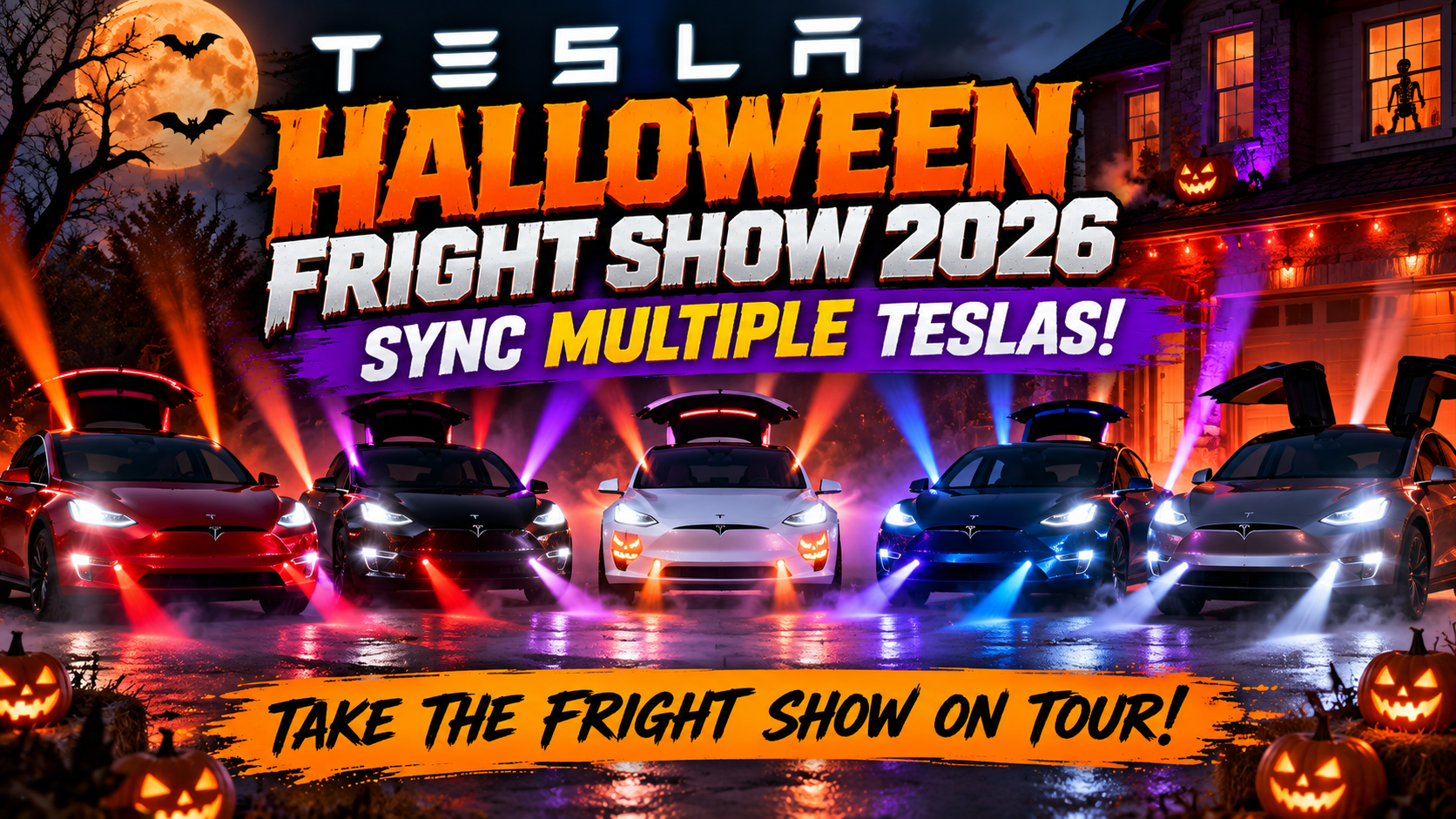
Tesla’s latest Halloween update has a feature that could turn your driveway into the coolest Halloween attraction in the neighborhood. And the best part? You can get other Tesla owners involved.
Imagine five Teslas parked side by side.
The music starts.
Headlights begin flashing. Taillights pulse. Mirrors move. Trunks open and close on supported vehicles.
Every Tesla performs its part of the show, creating a coordinated Halloween spectacle.
Welcome to the Tesla Halloween Fright Show 2026.
Tesla’s 2026 Halloween software update introduces a spooky light-show experience that owners can schedule in advance. And thanks to Tesla’s existing ability to synchronize Light Shows across multiple vehicles, there’s an opportunity to take the fright show beyond your own driveway.
Whether you’re planning a Halloween party, organizing a Tesla owner meetup, or just want to impress the neighborhood, here’s how to bring several Teslas together for a synchronized Halloween light show.
What’s New With Tesla’s Halloween Fright Show in 2026?
Tesla has always been known for hiding entertaining features inside its vehicles.
From Santa Mode and Rainbow Road to Boombox and custom Light Shows, the company regularly adds features that make owning a Tesla a little more fun.
But the 2026 Halloween update takes things further.
Introduced with software version 2026.38.3, Halloween Mode transforms your Tesla into what feels like a haunted house on wheels.
The update includes several seasonal features:
- Ghost-themed vehicle visualizations.
- Spooky sounds and lighting effects.
- Trick or Treat Mode.
- Halloween-themed vehicle wraps.
- A creepy voice effect through Boombox.
- Halloween Photobooth features on supported vehicles.
- A new scheduled Halloween Fright Show.
The Fright Show is particularly interesting because it turns your Tesla into an animated Halloween decoration.
Instead of simply changing your vehicle’s appearance on the touchscreen, the car becomes part of a musical performance.
And when several Tesla owners participate, the result can be spectacular.
What Is the Tesla Halloween Fright Show?
The Tesla Halloween Fright Show is a special Halloween-themed version of Tesla’s Light Show feature.
When activated, your vehicle performs a choreographed sequence of lighting and supported vehicle movements synchronized to music.
Depending on the vehicle model and hardware, the show can involve:
Headlights: Flashing and pulsing to the music.
Taillights: Coordinated lighting effects.
Exterior lighting: Different sections of the vehicle illuminating throughout the performance.
Mirrors: Folding or unfolding as part of supported sequences.
Trunk movements: Certain vehicles can open and close powered closures during a show.
Interior lighting: Supported vehicles may incorporate cabin lighting effects.
Not every Tesla performs exactly the same movements. The available effects depend on the vehicle and the light-show sequence.
The result is a parked vehicle that appears to dance along with the music.
Now imagine several Teslas doing that together.
That’s where things get really interesting.
Can You Synchronize the Halloween Fright Show With Other Teslas?
Yes! Multiple Tesla vehicles can be coordinated to perform synchronized Light Shows.
Tesla demonstrated this capability back in 2022, showing owners how to schedule Light Shows across multiple vehicles.
The same scheduling concept can be used to coordinate compatible Halloween Fright Shows.
Rather than manually pressing Start on each vehicle and hoping the timing works out, owners can schedule their shows to begin at the same time.
This makes it possible to organize a multi-car performance.
Here’s How It Works
Imagine you have four Tesla owners participating.
Each owner prepares their vehicle for the Halloween Fright Show.
The cars are parked together in a safe location.
Each owner schedules the same show to begin at 7:30 p.m.
When the scheduled time arrives, the vehicles begin their performances together.
The effect can look like a miniature Tesla light-show concert.
Important: This is coordinated scheduling, not a feature that automatically discovers nearby Teslas and connects them into a group.
Each participating vehicle must be set up individually.
How to Set Up a Tesla Halloween Fright Show
Ready to try it?
Here’s how to prepare your Tesla for a Halloween Light Show.
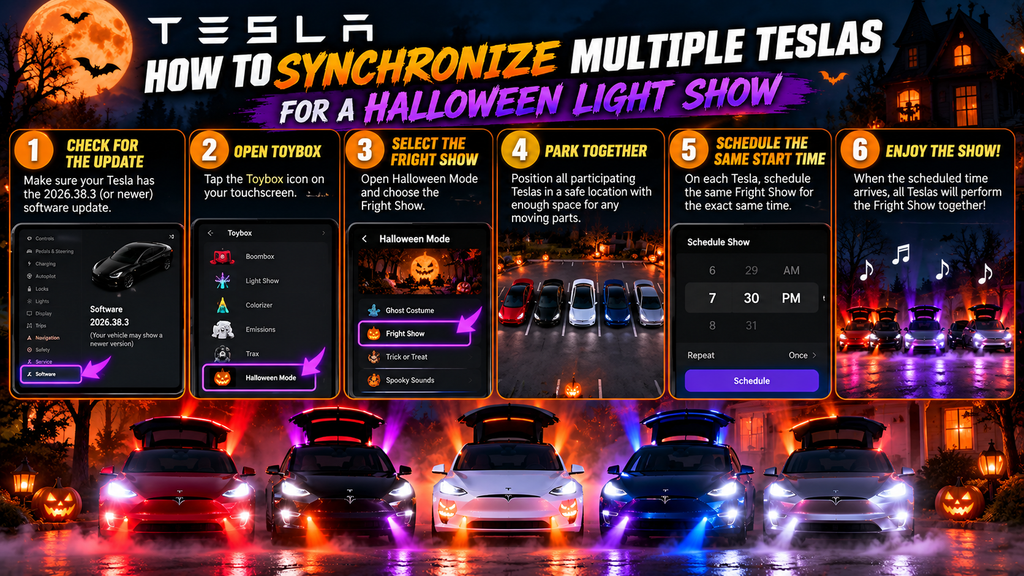
Step 1: Make Sure Your Tesla Has the Halloween Update
First, check whether your vehicle has received the necessary software update.
On your Tesla touchscreen:
- Open Controls.
- Select Software.
- Check your installed software version.
- Install an available update if necessary.
Halloween Mode arrived with the 2026.38 software family, although feature availability can vary by vehicle and hardware.
Tesla rolls out software updates gradually, so not every owner receives an update at the same time.
Step 2: Open the Tesla Toybox
Once the update is installed:
- Open Toybox on your touchscreen.
- Look for Halloween Mode to explore the new seasonal features.
- Find the Light Show controls in Toybox.
- Select the available Halloween-themed Fright Show.
The precise menu presentation may vary by software version.
Step 3: Choose a Safe Location
Before starting the show, park your Tesla in an open area.
Make sure there is enough space around the vehicle for any supported moving components.
Avoid parking close to walls, other vehicles, decorations, or anything that could interfere with doors, mirrors, or powered closures.
Your Tesla should be parked securely throughout the performance.
Step 4: Schedule the Fright Show
Tesla’s Light Show feature allows owners to schedule a show for a specific time.
Choose the Halloween Fright Show and use the scheduling option when available.
For example:
Scheduled Start: 7:30 p.m.
The show should begin at the selected time.
If you’re performing alone, you’re ready to go.
But if you’re organizing a group show, there’s one more step.
How to Synchronize Multiple Teslas for a Halloween Light Show
This is where the real fun begins.
Tesla owners can coordinate their vehicles by scheduling the same Light Show for the same starting time.
Here’s a practical way to organize it.
Step 1: Gather Your Tesla Owners
Start with two or three Teslas.
You don’t need a massive group to create an impressive display.
A pair of Teslas performing together can already look fantastic.
But if you have access to a local Tesla owners group, consider organizing a larger gathering.
Potential participants might include owners of:
- Tesla Model 3
- Tesla Model Y
- Tesla Model S
- Tesla Model X
- Tesla Cybertruck
Compatibility and supported effects vary by vehicle.
Step 2: Arrange the Vehicles
For the best visual effect, position the cars where spectators can see their lights.
A simple arrangement is a straight line:
Tesla 1 | Tesla 2 | Tesla 3 | Tesla 4
Another option is a semicircle.
This can make the performance more immersive for people watching from a central viewing area.
Make sure vehicles have enough clearance for any moving parts.
Step 3: Select the Same Fright Show
Each owner should select the same Halloween Fright Show.
Using the same sequence is important if you want the vehicles to appear synchronized.
If different shows are selected, the lighting patterns and music may not match.
Step 4: Schedule the Same Starting Time
This is the most important part.
Every participating Tesla should be scheduled to begin at exactly the same time.
For example:
| Vehicle | Scheduled Time |
|---|---|
| Tesla Model 3 | 7:30 p.m. |
| Tesla Model Y | 7:30 p.m. |
| Tesla Model S | 7:30 p.m. |
| Tesla Cybertruck | 7:30 p.m. |
When the scheduled time arrives, the cars should begin their shows together.
Minor timing differences may occur, so it’s worth running a test before inviting spectators.
Step 5: Enjoy the Show
Once everything is ready, stand back and watch.
The coordinated lighting effects can transform an ordinary parking area into a Halloween attraction.
For an even better experience, consider recording the performance from a wide angle.
You might end up with a video worth sharing with Tesla owners everywhere.
Take the Fright Show on Tour: 5 Fun Ideas for Tesla Owners
The ability to coordinate multiple Teslas opens up some creative possibilities.
Instead of limiting the show to your driveway, why not turn it into a Halloween event?
Here are five ideas.
1. Organize a Neighborhood Tesla Fright Show
Imagine several Tesla owners in your neighborhood getting together on Halloween night.
Park the vehicles in a safe, approved location and schedule a synchronized show.
Families walking through the neighborhood could enjoy a unique Halloween attraction.
You could even decorate the surrounding area with pumpkins, LED lights, and spooky decorations.
Just make sure decorations don’t interfere with the vehicles.
2. Host a Tesla Halloween Meetup
If you’re part of a Tesla owners club or local EV community, consider organizing a Halloween meetup.
Invite participants to bring their Teslas and join the synchronized performance.
You could make it an evening event with music, costumes, and a group photo.
A coordinated Fright Show would make a memorable finale.
3. Create a Tesla Trunk-or-Treat Display
Trunk-or-treat events are a popular Halloween tradition.
Why not give yours a Tesla twist?
Participating owners could decorate their parked vehicles and schedule a Fright Show as part of the festivities.
Coordinate with the event organizer and keep spectators clear of vehicles during the performance.
4. Record a Multi-Tesla Halloween Video
If you enjoy creating content for Facebook, YouTube, or TikTok, a synchronized Tesla Fright Show could make an entertaining video.
For the best results:
- Film after sunset.
- Position the camera where all participating cars are visible.
- Use a tripod.
- Avoid bright lighting that washes out the vehicle effects.
- Record a complete test performance.
A row of Teslas flashing their lights in unison can make for a dramatic nighttime video.
5. Challenge Another Tesla Owners Group
Here’s an idea that could become a fun annual tradition.
Have one Tesla owners group organize a Halloween Fright Show.
Then challenge another group to create an even bigger performance.
Which group can gather the most participating Teslas?
Which group has the best vehicle arrangement?
Which group creates the most entertaining video?
It’s a fun way to bring Tesla enthusiasts together.
Can You Create Custom Synchronized Tesla Light Shows?
Yes.
Tesla also supports custom Light Shows, giving enthusiasts the ability to create their own sequences.
These custom performances can include choreographed lighting and other supported vehicle effects.
Tesla provides an official Light Show project that includes technical resources for creating custom sequences.
For owners who enjoy experimenting with software and vehicle technology, this opens up even more possibilities.
How Custom Shows Differ From the Halloween Fright Show
The built-in Halloween Fright Show provides a ready-made seasonal performance.
Custom Light Shows require additional preparation.
Creators generally work with compatible sequence files and audio, then load the show onto their vehicles according to Tesla’s instructions.
For synchronized custom performances, each participating car can be prepared with the appropriate sequence and scheduled to start at the same time.
Advanced creators can even design different parts for different cars, creating effects that move across an entire row of vehicles.
For example:
Tesla 1 flashes → Tesla 2 flashes → Tesla 3 flashes → Tesla 4 flashes
This can create the illusion of lighting traveling across the group.
It’s more complicated than simply running the built-in Fright Show, but the creative possibilities are impressive.
Does Every Tesla Support the Halloween Fright Show?
Not necessarily.
Tesla’s Halloween features vary depending on software version, vehicle model, and infotainment hardware.
Some newer features rely on AMD Ryzen infotainment systems.
Older Intel-equipped vehicles may receive a more limited selection of Halloween features.
The standard Light Show feature also has its own compatibility requirements.
Before planning a group event, have each participant confirm that their vehicle actually offers the selected show.
Don’t assume that every Tesla receiving some Halloween-themed features can perform the complete Fright Show.
If you’re organizing a multi-car performance, run a compatibility check and test each vehicle beforehand.
Why Won’t My Tesla Halloween Fright Show Work?
If your Tesla isn’t performing the Fright Show as expected, several common issues could be responsible.
1. Your Tesla Hasn’t Received the Update
Halloween Mode was introduced in the 2026.38 software family.
Check your software version and available updates.
Remember that Tesla software rollouts happen gradually.
2. Your Vehicle Doesn’t Support the Feature
Some Halloween effects require specific vehicle hardware.
If the Fright Show isn’t available in your Toybox, check whether your vehicle supports it.
3. The Vehicles Aren’t Starting Together
If you’re coordinating several Teslas, make sure each vehicle is scheduled for the same time.
Don’t rely on multiple people manually pressing Start simultaneously.
Scheduled starts generally offer a better way to coordinate the performance.
4. Different Shows Are Selected
Make sure every participating Tesla has selected the intended sequence.
Different shows may have different music and lighting patterns.
5. The Show Stops or Doesn’t Perform Every Effect
Light Show behavior can vary by vehicle.
Some models may not support every moving component used in a sequence.
Always allow adequate clearance and follow the vehicle’s on-screen instructions.
Is It Safe to Run a Multi-Tesla Halloween Light Show?
A coordinated Tesla Light Show can be a fun event, but safety should come first.
Keep these precautions in mind.
Use private property or an approved event location. Don’t obstruct public roads, sidewalks, emergency access, or active parking lanes.
Leave enough space between vehicles. Some sequences may operate powered closures or other moving components.
Keep spectators at a safe distance. Children should not stand between vehicles during a performance.
Consider neighbors. Bright flashing lights and music may disturb nearby residents, especially late at night.
Avoid creating traffic distractions. Don’t run a show where flashing lights could confuse drivers.
Respect people with photosensitivity. Light Shows may include flashing effects that are unsuitable for some spectators.
And, of course, never attempt to perform a Light Show while driving.
The vehicles should remain parked for the entire performance.
What’s the Difference Between Halloween Mode, Trick or Treat Mode, and Fright Show?
Tesla’s 2026 Halloween update includes several features that are easy to confuse.
Here’s how they compare.
| Feature | What It Does | Best Use |
|---|---|---|
| Halloween Mode | Adds spooky visuals and seasonal effects | Everyday Halloween fun |
| Ghost Costume | Changes your Tesla’s on-screen vehicle appearance | Spooky touchscreen visuals |
| Trick or Treat Mode | Plays sounds and flickers lights when visitors approach | Parked Halloween display |
| Halloween Fright Show | Performs a scheduled musical light sequence | Halloween parties and group shows |
| Custom Light Show | Plays a user-created compatible sequence | Personalized performances |
The biggest difference is that Trick or Treat Mode reacts to visitors, while Fright Show is a choreographed performance.
If your goal is to coordinate several vehicles, the scheduled Light Show functionality is what you want.
One important note: Tesla reports that Trick or Treat Mode disables Sentry Mode, the security alarm, and walk-away locking while active. Owners should understand those trade-offs before leaving the feature enabled.
Will Tesla Add More Multi-Car Halloween Features?
Tesla has not confirmed a dedicated Halloween feature that automatically links nearby vehicles together.
However, the ability to schedule synchronized Light Shows creates plenty of possibilities for future seasonal events.
Imagine a Halloween show designed specifically for ten vehicles.
Or a performance where the music and lighting move from one Tesla to another.
Tesla’s custom Light Show capabilities already provide ways for enthusiasts to experiment with multi-car choreography.
Whether Tesla expands the built-in seasonal experience remains to be seen.
For now, owners can have plenty of fun using the tools already available.
Tesla Halloween Fright Show 2026: Frequently Asked Questions
Can multiple Teslas perform the Halloween Fright Show together?
Yes, compatible Teslas can coordinate Light Shows by scheduling the same performance to start at the same time.
Each vehicle must be prepared individually.
Do Teslas automatically connect to synchronize their Light Shows?
No.
Tesla’s documented multi-vehicle Light Show approach uses coordinated scheduling rather than automatic wireless pairing between nearby vehicles.
How many Teslas can participate in a synchronized Fright Show?
Tesla has demonstrated multi-vehicle Light Shows, but there isn’t a confirmed universal maximum for the 2026 Halloween Fright Show.
The practical number depends on vehicle compatibility, available space, and how well the group is coordinated.
Can I run the Fright Show without other Teslas?
Absolutely.
The Halloween Fright Show can be enjoyed as a single-vehicle performance on supported Teslas.
Do I need a USB drive for the Halloween Fright Show?
The built-in Halloween Fright Show is part of the vehicle’s supported software features and does not generally require loading a custom sequence from USB.
Custom Light Shows are different and may require USB-based files.
Can I create my own Halloween music and lighting sequence?
Yes.
Tesla supports custom Light Shows through its Light Show project.
Creating a custom performance requires additional tools and preparation.
Does Halloween Mode work on older Teslas?
Feature availability varies.
Some older Tesla vehicles may receive limited Halloween functionality, while newer hardware supports additional effects.
Check your vehicle’s installed software and Toybox options.
Can I schedule the Fright Show for Halloween night?
Yes, on compatible vehicles offering the scheduled Light Show functionality.
For group performances, coordinate the same start time across all participating vehicles.
Final Thoughts: Tesla’s Halloween Fright Show Is Better With Friends
Tesla’s 2026 Halloween update is packed with entertaining features.
But the Halloween Fright Show might be one of the most exciting additions for owners who enjoy showing off what their cars can do.
A single Tesla performing a spooky light show is entertaining.
Five or ten Teslas performing together? That’s an entirely different experience.
Whether you’re organizing a neighborhood event, participating in a Tesla meetup, or creating a Halloween video, synchronized Light Shows give Tesla owners another reason to get together.
And with Halloween right around the corner, now is the perfect time to start planning.
Think You Know Everything About Your Tesla?
If you love discovering hidden Tesla features, there’s something else you should try.
Take the FREE Tesla Owner Challenge at MyTeslaSavings.com!
Test your knowledge with 20 questions covering Tesla technology, charging, maintenance, accessories, and DIY upgrades.
Earn up to 100 points, compete on our monthly leaderboard, and see whether you have what it takes to become Tesla Owner of the Month.
Take the Challenge:
https://myteslasavings.com/tesla-owner-challenge/
And don’t forget to follow My Tesla Savings on Facebook for more hidden Tesla features, software updates, money-saving tips, and upcoming community contests.
Have You Tried a Multi-Tesla Fright Show?
We want to hear about it!
How many Teslas could you get together for a synchronized Halloween Light Show?
Two? Five? Ten?
Share your plans and experiences with the My Tesla Savings community.
Disclaimer: Feature availability depends on Tesla model, hardware, region, and software version. Always follow Tesla’s vehicle instructions and applicable local regulations when performing Light Shows. MyTeslaSavings.com is an independent Tesla enthusiast website and is not affiliated with Tesla, Inc.